
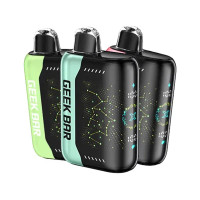
What Boost Mode Actually Does, and How to Use It on Each Device
30th Mar 2026
Boost mode fires a second coil alongside the first. You get a warmer, thicker draw, and the device empties faster. That is the whole trade, and every device below prices it differently.
If you only read one line: the puff count on the box is the Regular number. Switch to boost and the real figure drops by roughly 40 to 50 percent. Nothing is wrong with your device when that happens.
What boost actually changes
A disposable with two modes has two coils, or one coil it can drive two ways. Regular runs it gently. Boost runs it hard.
- More vapor and more flavor up front. Hotter coil, denser cloud, and the flavor reads louder for the first second of the draw.
- Fewer total puffs. You are pulling more e-liquid and more battery per hit. On the devices that publish both numbers, boost costs you 40 to 50 percent of the total.
- More charging. Every one of these is rechargeable over USB-C. In boost you will be plugging in more often.
- Nothing about nicotine strength. Boost does not change the percentage in the liquid. It changes how much liquid you get per pull, which is not the same thing and is worth knowing if you are watching your intake.
What it costs, device by device
These are the manufacturers' own figures, taken from Geek Bar's product pages and from the spec sheets on our own listings. Where a maker does not publish a second number, we have not invented one.
| Device | Modes | Regular | Boosted | What you give up |
|---|---|---|---|---|
| Geek Bar Pulse | Regular, Pulse | 15,000 puffs | 7,500 puffs | Half the device |
| Geek Bar Pulse X | Regular, Pulse | 25,000 puffs | 15,000 puffs | Two fifths |
| RAZ LTX 25K | Normal, Boost | 25,000 puffs at 12W | 15,000 puffs at 24W | Two fifths, at double the wattage |
| RAZ LTX Dew 50K RAZ calls it the RX50K Dew Edition |
Normal, Boost, Super Boost | Up to 50,000 puffs | Not published | Two steps of boost rather than one |
| Geek Bar Pulse X2 50K | Regular, Pulse | 50,000 puffs | 25,000 puffs | Half the device |
| Geek Bar Pulse 2 25K | Regular, Pulse | 25,000 puffs | 15,000 puffs | Two fifths |
Where those numbers come from. Every figure in that table is Geek Bar's or RAZ's own, printed on the spec panels that sit on our product pages. The one gap is the RAZ LTX Dew 50K. RAZ's own product page gives a maximum of 50,000 puffs and names three modes, Normal, Boost and Super Boost, without a figure for each, so those cells are left alone.
The devices
Geek Bar Pulse

The one that started the category. Dual mesh coil, 16mL of 5 percent salt nicotine, a 650mAh battery that recharges over USB-C, and an onboard screen showing battery and e-liquid at the same time. Regular 15,000 puffs, Pulse 7,500. This is the clearest boost trade of the six: you are halving the device.
Also in 0 percent nicotine.
Geek Bar Pulse X

The upgrade, and the one most people mean when they say boost. Geek Bar's own page lists 18mL, 5 percent nicotine, Regular 25,000 puffs and Pulse 15,000, with dual mesh coils, adjustable airflow and a 3D curved screen. Geek Bar also says quick charging takes it to 80 percent in about twenty minutes, which matters more in Pulse mode than in Regular.
Also in 0 percent nicotine.
Geek Bar Pulse X2 50K
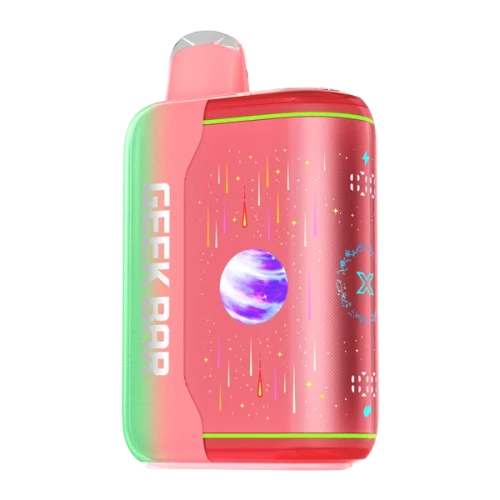
Twice the puff count of the Pulse X on paper, and the biggest drop of the six when you switch. Geek Bar's own spec panel reads 50,000 puffs in Regular mode and 25,000 in Pulse mode, on 18mL at 5 percent nicotine with dual 0.6ohm mesh coils, a 1000mAh battery and a 3D curved screen. Running it in Pulse turns a 50K device into a 25K one.
Geek Bar Pulse 2 25K
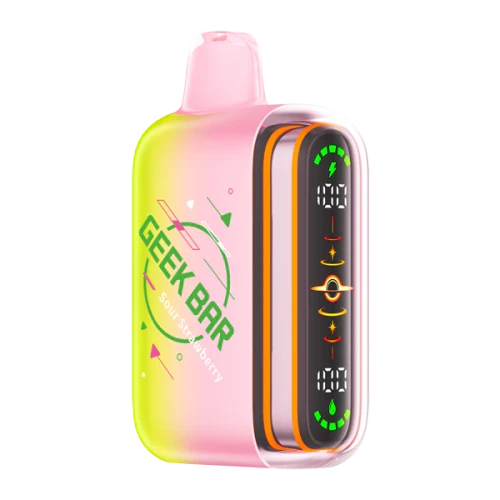
The newest of the Geek Bars and the gentlest trade. Regular 25,000 puffs, Pulse 15,000, from a 0.8ohm dual mesh coil and an 800mAh battery that takes fifteen minutes to reach 80 percent. The giveaway is the colour: the screen and the light strip run green in Regular and orange in Pulse, so you can tell which mode you are in from across a room.
RAZ LTX 25K

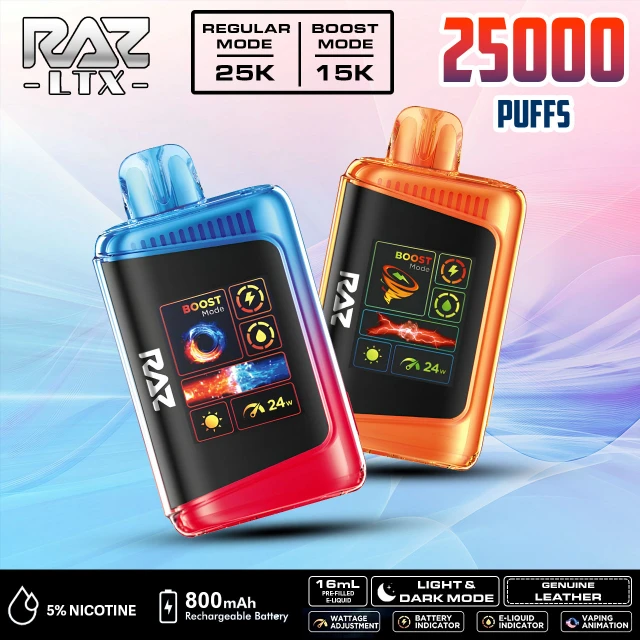
This is what Boost looks like on the screen: the word BOOST at the top left and 24W at the bottom right. In Normal the same corner reads 12W.
The only one of the six that puts a wattage on each mode: Normal at 12W for up to 25,000 puffs, Boost at 24W for up to 15,000. Double the power, two fifths off the total. It has a dedicated wattage adjustment button, adjustable airflow and a 1.77 inch animated screen reading e-juice and battery.
Also in 0 percent nicotine.
RAZ LTX Dew 50K (RAZ calls it the RX50K Dew Edition)

The only three-mode device here. RAZ's own page gives it up to 50,000 puffs and three modes, Normal, Boost and Super Boost, on a 19mL pod at 5 percent salt nicotine with an LED screen and USB-C charging. RAZ does not publish a puff figure for each mode, so treat the 50,000 as the Normal-mode ceiling and expect Super Boost to cost you the most of it.
Which mode should you actually use?
- Regular for daily use. It is what the puff count was measured in and what the device is tuned for.
- Boost when you want it, not as the default. A few boosted pulls after a meal or at the end of the day cost you very little. Living in boost is how a 25,000 puff device turns into a 15,000 puff device without you noticing.
- If the flavor has gone flat, try Regular, not boost. A hotter coil on a nearly empty pod is how you get a burnt pull. Boost is not a fix for a device that is running out.
- If you are cutting down, stay in Regular. Boost pulls more liquid per draw at the same nicotine percentage.
How to switch boost on, device by device
There are only two controls in this whole article. The four Geek Bars use a slide switch on the bottom of the device. The two RAZ devices use the small button beside the screen. Nothing here needs a menu and nothing needs an app.
The four Geek Bars: the switch on the bottom
Turn the device over. The switch sits in the base, and it has three positions rather than two:
- Fully closed is how the device ships. Nothing fires.
- The middle position is Regular. This is the mode the puff count on the box was measured in.
- The far position, marked Pulse, is boost. Slide it all the way across and both coils fire.
On the Pulse X and the Pulse X2 that same switch opens the airflow as it moves, so Pulse is a looser draw as well as a harder one. On the Pulse 2 the screen tells you where you are without you having to look underneath: green is Regular, orange is Pulse. On the original Pulse, a rocket icon appears on the display in Pulse mode.
To go back, slide it the other way. There is no press-and-hold and no click count on any of the four.
The two RAZ devices: the button beside the screen
The RAZ control is a small button on the side of the body, next to the display. The slider in the base of a RAZ is airflow, not mode, which is the single most common mix-up on these devices, so if you have been sliding the bottom of an LTX and nothing changed on the screen, that is why.
- RAZ LTX 25K: one click wakes the screen in Normal. A second click puts it in Boost, and the screen then reads BOOST with 24W in the corner instead of 12W. Click again to come back.
- RAZ LTX Dew 50K: the same button, one more step. It cycles Normal, then Boost, then Super Boost, and the screen names the mode each time.
One thing not to confuse with the mode button on either RAZ: holding that same button for about five seconds switches the display between light and dark. That changes how the screen looks and nothing about how the device fires.
If your device does none of this, check you have the model you think you have. These change fast, and the device in your hand may be a newer run than the one in the picture. Any of our Michigan shops will set it with you.
Common questions
Does boost mode drain the battery faster?
Yes. Boost fires a second coil or drives one harder, so it pulls more battery and more e-liquid per draw. On the RAZ LTX that is the difference between 12W in Normal and 24W in Boost. It is also why the puff count falls: the devices here lose roughly 40 to 50 percent of their total when you run them boosted.
How do I turn off Pulse mode on a Geek Bar?
Slide the switch in the base back from the Pulse end to the middle position, which is Regular. There is no button to hold and no click count. On the Pulse 2 the colour tells you where you are without turning the device over: green is Regular, orange is Pulse.
What is Super Boost on a RAZ?
It is the third power setting on the RAZ LTX Dew 50K, which RAZ sells as the RX50K Dew Edition. The side button cycles Normal, then Boost, then Super Boost, and the screen names the mode each time. RAZ publishes one figure for the device, up to 50,000 puffs, and no separate number for each mode.
Why is my RAZ not switching modes when I slide the bottom?
Because the slider in the base of a RAZ is the airflow, not the mode. Mode is the small button beside the screen. This is the single most common mix-up on these devices.
Does boost mode change the nicotine strength?
No. The percentage in the liquid is fixed. Boost changes how much liquid you get per pull, which is not the same thing, and is worth knowing if you are watching your intake.
More in our how to guides, and the full range is on the disposables shelf.
For adults 21+. Nicotine is an addictive chemical.